vue 朝花夕拾系列(4)- 组件通信vuex

vue 朝花夕拾系列(4)主要收录的就是vue组件间通信的几种方式,如
1.props、$emit/$on
2.vuex
3.$parent/$children
4.$refs
5.$root
6.$attrs/$listeners
7.provide/inject
8.中央事件bus(eventBus)
9.路由传参

本文主要阐述第二种:vuex的方式进行多组件数据通信…

vuex

Vuex 是一个专为 Vue.js 应用程序开发的状态管理模式。它采用集中式存储管理应用的所有组件的状态,并以相应的规则保证状态以一种可预测的方式发生变化。

Vuex具有以下特点:

全局
Vuex类似于一个全局变量,它在整个Vue应用中生效。

统一
只要状态修改,都会自动通知到所有相关组件,不需要使用者主动推送。

单一
在全局中只需要保存一份,即可在全局中使用。

Vuex解决了哪些问题:

数据跨组件共享,数据的传输不再受到父子级限制,可以在各级组件中任意获取。
防止数据被意外篡改,Vuex会记录数据被修改的详细信息,如修改状态的组件、时间、代码位置等,便于定位和追踪错误,同时也方便了调试和测试。
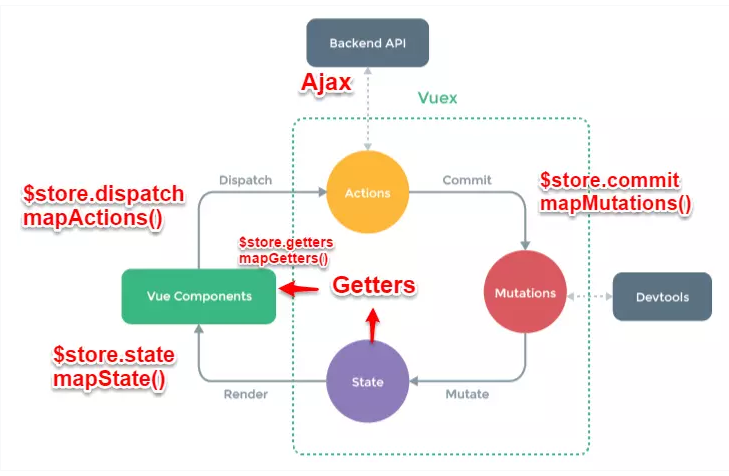
Flux

简单的说就是store里面存储的state是想要在跨多层级多组件共享的数据==》根据业务拆分成module不同的模块独立维护自己的顶层状态==》为了state维护,提高了修改它的门栏,只能通过$commit一个mutation触发state的修改==>通过触发同步或者异步的action来commit一个mutation来修改state。

这个Flux的单项数据流和react的redux思想其实是一样的。

Vuex 基本概念:

state:

定义存贮数据的仓库 ,可通过this.$store.state 或mapState访问

getter:

获取 store 值,可认为是 store 的计算属性,可通过this.$store.getter 或mapGetters访问

action:

异步调用函数执行mutation,进而改变 store 值,可通过 this.$dispatch或mapActions访问

mutation:

同步改变 store 值,为什么会设计成同步,因为mutation是直接改变 store 值,vue 对操作进行了记录,如果是异步无法追踪改变.可通过mapMutations调用

modules:

模块,如果状态过多,可以拆分成模块,最后在入口通过…解构引入

Vuex的使用

先使用vue-cli创建一个项目,之后使用npm install vuex –save安装Vuex,就可以在/src/main.js中配置Vuex:

1
2
3
4
5
6
7
8
9
10
11
12
13
14
15
16
17
18
19
20
21
22
23
24
25
26
27
28
29
30
31
32
33
34
35
// 1. vuex-引入
import Vuex from 'vuex'

// vue-cli自带的编译配置
Vue.config.productionTip = false

// 1. vuex-在Vue中使用Vuex,让Vuex中的操作挂载到Vue中。
Vue.use(Vuex)

// 3. vuex-声明store对象
const store = new Vuex.Store({
strict: process.env.NODE_ENV !== 'production', // 严格模式:防止直接修改state,只能用Mutations操作,由于strict模式是通过对象深度匹配进行,生产模式打开会严重影响性能。
state: {}, // 核心:数据
mutations: { // 定义Mutations
},
actions: { // 定义actions
},
getters: {
a: state => state.app.a,
b: state => state.app.b,
fullName:state=> `${state.user.firstName} ${state.user.lastName}` // 当然也可以跨模块数据通过计算属性来组合
}, // 类似于computed
modules: {
app
} // 将store拆分成多个命名空间,分开使用。
})

/* eslint-disable no-new */
new Vue({
el: '#app',
router,
store, // 将store挂载到Vue实例中。
components: { App },
template: '<App/>'
})

读取state的值

1
2
3
4
5
6
7
8
// 在Index.vue中可以通过$store.state.a读取到已定义的a的值。
<template>
<div>
<Cmp1/>
// 读取Vuex的state
a: {{ $store.state.a }}
</div>
</template>

修改state的值

  • 可以通过commit一个mutation修改state
  • 可以通过dispatch一个action触发mutation来修改state
1
2
3
4
5
6
7
8
9
10
11
12
13
14
//定义Actions和Mutations
const app = {
state: {a: 12, b: 5}, // 核心:数据
mutations: { // 定义Mutations,通过action触发并更新state,Vue Devtool可以监听到数据的修改情况。
add (state, n) { // 第一个参数为旧state,第二个参数为action中commit传入的参数。
state.a += n
}
},
actions: { // 定义actions,actions被触发后,将数据提交给Mutations进行处理并更新state。
add ({ commit }, n) { // 第一个参数为context对象,它不是store本身,可以通过context.commit提交一个Mutation。第二个参数为用于更新state的参数。
commit('add', n)
}
}
}
1
2
3
4
5
6
7
8
9
10
11
12
13
14
15
16
17
18
19
20
21
22
    // 接下来实现在Cmp1.vue组件中,点击按钮后修改state中的a的值
<template lang="html">
<div class="">
<input type="button" value="+5" @click="fn()">
</div>
</template>

<script>
export default {
name: 'cmp1',
methods: {
fn(){
// this.$store.state.a+=5; // 在严格模式下,直接修改state可以成功,但会报错
// this.$store.commit('add', 5); // 直接触发一个Mutation其实也可行,且不会报错,但这其实违背了Vuex设计的初衷。
this.$store.dispatch('add', 5); // 触发一个action,实现数据修改。
}
}
}
</script>

<style lang="css" scoped>
</style>

vuex辅助函数mapGetters/mapState/mapAction

Getter的基本使用(this.$store.getters.count)

Vuex中的Getter的作用类似于Vue中的Computed,可以实现在state变化时自动计算出一个新的结果。

  • 在store中配置一个Getter:
1
2
3
4
5
6
7
8
modules:{
// 假如有两个模块
firstNameModule,
lastNameModule
},
getters: {
fullName:state=> `${state.firstNameModule.firstName} ${state.lastNameModule.lastName}` // 当然也可以跨模块数据通过计算属性来组合
}
  • 在组件中,可以通过$store.getters.count就可以读取到相应的值。:
1
<div>count from getters: {{$store.getters.count}}</div>
  • 为了方便使用,通常可以把Getter配置到Computed中
1
2
3
4
5
computed: {
countFromComputed() {
return this.$store.getters.count
}
}
  • 在Template中引用
1
<div>count from computed: {{countFromComputed}}</div>
  • 利用Computed的get/set更新State:因为Computed属性支持get和set方法,所以能够使用set方法更新State。
    1
    2
    3
    4
    5
    6
    7
    8
    9
    10
    11
    12
    13
    14
    15
    16
    17
    // 首先在Store中设置actions和Mutations。
    mutations: {
    addA (state, n) {
    state.a += n
    },
    addB (state, n) {
    state.b += n
    },
    },
    actions: {
    addA ({commit}, n) {
    commit('addA', n)
    },
    addB ({commit}, n) {
    commit('addB', n)
    },
    },

在计算属性的set中触发action或者commit触发mutation修改state

1
2
3
4
5
6
7
8
countFromComputedSet: {
get() {
return this.$store.getters.count
},
set(value) {
this.$store.dispatch('addA', 5)
},
},

map映射函数

map辅助函数

mapState的使用

  • 首先需要引入map函数
1
import { mapState, mapActions, mapGetters } from 'vuex'
  • 在computed中使用mapState:
1
2
3
computed: {
...mapState(['a', 'b']),
}
  • 就可以代替这段代码
1
2
3
4
5
6
7
8
computed: {
a() {
return this.$store.state.a
},
b() {
return this.$store.state.b
},
}

mapActions的使用

  • 在methods中添加addA和addB的映射
1
2
3
methods: {
...mapActions(['addA', 'addB']),
},
  • 等价于
1
2
3
4
5
6
7
8
methods: {
addA(n) {
this.$store.dispatch('addA', n)
},
addB(n) {
this.$store.dispatch('addA', n)
},
}

mapGetters的使用

  • 在computed中添加count的映射:
1
2
3
computed: {
...mapGetters(['count'])
}
  • 等价于
1
2
3
4
5
computed: {
count() {
return this.$store.getters.count
}
}
  • 也可以
1
2
3
methods: {
...mapGetters(['count'])
}
  • 等价于
1
2
3
4
5
methods:{
count(){
return this.$store.getters.count
}
}

参考链接

Vuex入门
Vuex Getter
mapState、mapActions、mapGetters

初到贵宝地,有钱的给个钱场,没钱的挤一挤给个钱场