vue 朝花夕拾系列(2)- vue组件化

vue 朝花夕拾系列(2)主要收录的就是vue的组件化部分的内容,简单描述一下一个vue实例或者说是组件内部包含哪些配置项目…

组件化

Vue组件 = Vue实例 = new Vue(option) 其实vue组件就是一个个不同option配置的vue实例。

1
2
3
4
5
6
7
8
9
10
11
12
// 用法
<component-demo // 一般在html中使用分割
name="Hello Vue!" // 原生属性
:type="type"
:is-visible="false"
:on-change="handlePropChange"
title="属性Demo" // 原生属性
class="test1" // 原生属性
:class="['test2']" // 这种写法等价于class="test2"
:style="{ marginTop: '20px' }"
style="margin-top: 10px" // 原生属性
/>
  • 配置组件的option
    1
    2
    3
    4
    5
    6
    7
    8
    9
    10
    11
    12
    13
    14
    15
    16
    17
    18
    19
    20
    21
    22
    23
    24
    25
    26
    27
    28
    29
    30
    31
    32
    33
    34
    35
    36
    37
    38
    39
    40
    41
    42
    43
    44
    45
    46
    47
    48
    49
    50
    51
    52
    53
    54
    55
    56
    57
    58
    59
    60
    61
    62
    var vueInstant = new Vue({
    name:'componentDemo', // 组件名称 非必填,js中使用小驼峰,在使用递归组件的时候必填
    inheritAttrs: false, // 没有声明的属性是否再组件的根节点自动挂载,默认是true
    // props:['props1Name','props2Name',], 不建议这么写
    props:{
    props1Name:{
    type:'String', // props类型 String/Number/Boolean/Function/Object/Array/Symbol
    required:false, // 是否必填
    default:'props1', // 默认参数
    },
    //对象或数组的默认值必须从一个工厂函数返回。当一个函数返回一个对象时,我们称之他为 工厂函数(factory function) 。
    props2Name:{
    type:'Object',
    default: function () {
    return { message: 'hello' }
    }
    },
    // 自定义验证函数
    props3Name: {
    validator: function (value) {
    return value > 10
    }
    },
    // 函数
    props4Name: {
    type:Function,
    default:()=>{}
    },
    // 数组
    props5Name: {
    type: Array,
    // 对象或数组默认值必须从一个工厂函数获取
    default: () => []
    }
    },// 组件绑定的属性
    el:"#app", // vueInstant.$mount('#app')
    data:{
    // 视图和数据进行了响应
    content:'hello world'
    },
    filters:{ // 自定义过滤器
    filterItem(item){
    return item.toLowerCase()
    }
    },
    computed:{ // 计算属性
    isValid(){
    return this.props1Name=='hello world'
    },
    newContent:{
    get:function(){
    return this.content.split('').reverse().join('')
    },
    set:function(newValue){
    // 修改了计算属性的setter方法可以接受到新的值
    }
    }
    },
    });
    -只有当组件实例的时候存在的属性才会触发视图的响应更新
    -未来产生的属性需要在实例的时候初始化
    -object.freeze(obj)会阻止修改现有的属性,也就不会触发视图的响应

2.组件的组成

- 属性:自定义的动态属性props/原生属性attrs/特殊的属性class/style
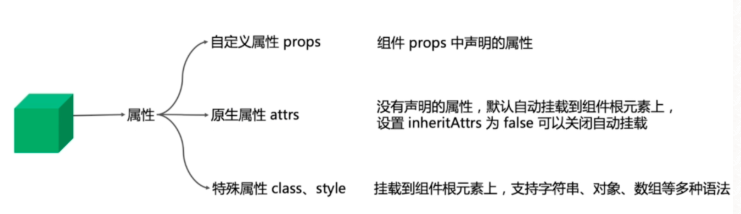
组件的组成

1
2
3
4
5
6
7
8
9
10
11
12
13
14
15
16
17
18
19
20
21
22
23
24
25
26
27
28
29
30
31
32
33
34
35
36
37
38
39
40
41
42
43
44
45
46
47
48
49
50
51
52
53
54
55
56
57
{
// 和`v-bind:class`一样的 API
'class': {
foo: true,
bar: false
},
// 和`v-bind:style`一样的 API
style: {
color: 'red',
fontSize: '14px'
},
// 正常的 HTML 特性
attrs: {
id: 'foo'
},
// 组件 props
props: {
myProp: 'bar'
},
// DOM 属性
domProps: {
innerHTML: 'baz'
},
// 事件监听器基于 `on`
// 所以不再支持如 `v-on:keyup.enter` 修饰器
// 需要手动匹配 keyCode。
on: {
click: this.clickHandler
},
// 仅对于组件,用于监听原生事件,而不是组件内部使用 `vm.$emit` 触发的事件。
nativeOn: {
click: this.nativeClickHandler
},
// 自定义指令。注意事项:不能对绑定的旧值设值
// Vue 会为您持续追踪
directives: [
{
name: 'my-custom-directive',
value: '2',
expression: '1 + 1',
arg: 'foo',
modifiers: {
bar: true
}
}
],
// Scoped slots in the form of
// { name: props => VNode | Array<VNode> }
scopedSlots: {
default: props => createElement('span', props.text)
},
// 如果组件是其他组件的子组件,需为插槽指定名称
slot: 'name-of-slot',
// 其他特殊顶层属性
key: 'myKey',
ref: 'myRef'
}

组件的分类:

全局组件

1
通过Vue.component('componentName',{ConfigOption})的方式全局注册。

局部组件

1
2
3
4
5
6
7
8
9
10
11
12
13
14
15
16
17
18
19
20
// 定义一个组件internalComponent.vue
export default{
name:'internalComponent',
...
}

<template>
<internal-component />
</template>
// 使用时候import并且局部注册
<script>
import internalComponent from './internalComponent.vue'
export default{
name:'parentComponent',
components:{
internalComponent // 局部注册
}
...
}
</script>

动态组件

1
2
3
4
5
6
7
8
9
10
11
12
13
14
15
16
17
18
19
20
21
22
23
24
25
26
27
28
<template>
<component :is="dynamicComponentName" />
<button @click="handleChangView('A')">切换到A</button>
<button @click="handleChangView('B')">切换到B</button>
<button @click="handleChangView('C')">切换到C</button>
</template>
<script>
import componentA from './componentA.vue'
import componentB from './componentB.vue'
import componentC from './componentC.vue'
export default{
components:{
componentA,
componentB,
componentC,
},
data(){
return{
dynamicComponentName:'componentA'
}
},
methods:{
handleChangView(val){
this.dynamicComponentName = `component${val}`
}
}
}
</script>
  • 当在这些组件之间切换的时候,你有时会想保持这些组件的状态,以避免反复重渲染导致的性能问题.重新创建动态组件的行为通常是非常有用的,如果更希望那些标签的组件实例能够被在它们第一次被创建的时候缓存下来。为了解决这个问题,我们可以用一个 元素将其动态组件包裹起来。
1
2
3
<keep-alive>
<component :is="dynamicComponentName"></component>
</keep-alive>

函数式组件

什么是函数式组件我们可以把函数式组件想像成组件里的一个函数,入参是渲染上下文(render context),返回值是渲染好的HTML
对于函数式组件,可以这样定义:

* Stateless(无状态):组件自身是没有状态的
* Instanceless(无实例):组件自身没有实例,也就是没有this

定义一个函数式组件就像这样:

1
2
3
4
5
6
7
8
9
10
11
12
13
14
15
16
17
// 
Vue.component('my-component', {
functional: true,
// Props 是可选的,你可以省略 props 选项,所有组件上的特性都会被自动隐式解析为 prop
props: {
// ...
},
// 为了弥补缺少的实例
// 提供第二个参数作为上下文
render: function (createElement, context) {
// ...
}
})

//如果你使用了单文件组件,那么基于模板的函数式组件可以这样声明:
<template functional>
</template>

就像上文所讲的,函数式组件没有this,参数就是靠context来传递的了,下面我们看下context有哪些属性呢

* props:提供所有 prop 的对象
* children
* slots (a slots object)
* parent
* listeners
* injections
* data

递归组件

组件在它的模板内可以递归的调用自己,只要给组件设置name组件就可以了,不过需要注意的是,必须给一个条件来限制数量,否则会抛出错误: max stack size exceeded

1
2
3
4
5
6
7
8
9
10
11
12
13
14
15
16
17
18
19
20
21
22
23
<template>
<div v-for="(item,index) in treeArr">
子组件,当前层级值: {{index}} <br/>
<!-- 递归调用自身, 后台判断是否不存在改值 -->
<tree :item="item.arr" v-if="item.flag"></tree>
</div>
</template>
<script>
export default {
// 必须定义name,组件内部才能递归调用
name: 'tree',
data(){
return {}
},
// 接收外部传入的值
props: {
item: {
type:Array,
default: ()=>[]
}
}
}
</script>
初到贵宝地,有钱的给个钱场,没钱的挤一挤给个钱场